Exploring the Benefits of Using Floorp Browser on Linux

Key Notes
- Floorp combines privacy with extensive customization options.
- Installation is straightforward using Flatpak or PPA methods.
- Unique features enhance user experience and privacy controls.
Discover the Floorp Browser: Privacy Meets Customization for Linux Users
Are you a Linux user who values privacy and customization? The Floorp browser, a Firefox fork, merges these elements for a superior browsing experience.
What Sets Floorp Apart?
Floorp, an open-source web browser based on the Firefox engine, offers enhanced security and customization, making it stand out among its peers.
- Advanced built-in security features such as ad-blocking and tracker protection.
- Commitment to user privacy with no data collection.
- Faster browsing speed compared to Firefox and Chrome.
- Innovative features like split view and workspaces for an organized browsing experience.
Installing the Floorp Web Browser
To get started with Floorp on your Linux machine, follow the instructions below:
Step 1: Installing Floorp on Linux
You can use the flatpak command or add a PPA for Debian-based systems to install Floorp.
Adding the PPA Repository
For users on a Debian-based distribution, execute the following commands to add Floorp’s repository:
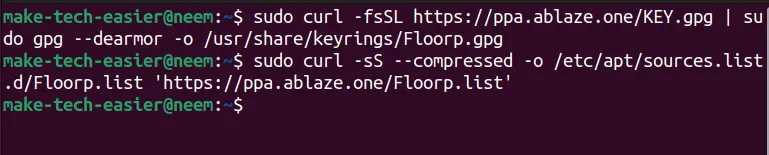
Updating Repositories
Next, update your system repositories and install Floorp with the following:
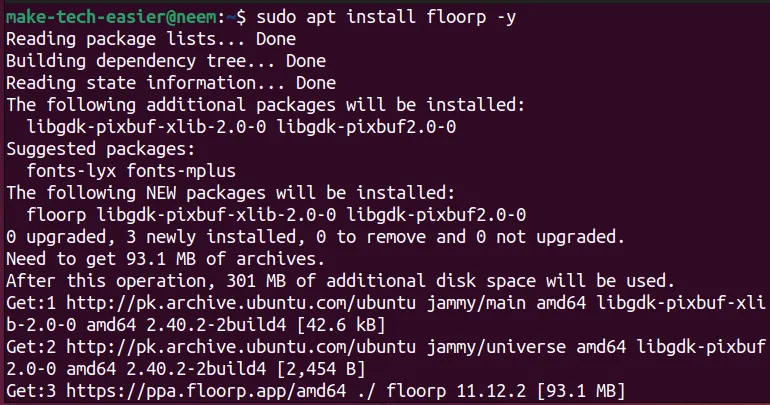
Alternatively, if you’re comfortable with compiling from source, Floorp’s source code is available on GitHub.
Configuring Your Floorp Experience
Once installed, you can launch Floorp from your applications menu. On first launch, choose to sync with Firefox, or opt to explore without signing in by selecting “Skip to Start Browsing.”
Exploring Floorp’s Features
Let’s dive into the exciting functionalities that Floorp has to offer:
Dynamic Backgrounds
Floorp features random wallpapers by default, sourced from Unsplash, which can be customized through the Settings menu.
Browser Manager Sidebar
A dedicated sidebar provides quick access to helpful features and customizable options for personal preference.
Using Floorp Notes
Manage important notes directly within the sidebar, which can be synced and backed up through Settings.
Customizable Browser Appearance
Choose from various themes and experiment with a bottom navigation bar to tailor Floorp’s look to your liking.
Adjusting Tab Bar Style
Customize the position of your tab bar, including a vertical option, for an organized browsing workflow.
Tailored Browsing Experience
Personalize your experience by adjusting font styles, language preferences, and more through the settings.
Robust Privacy and Security
With multiple layers of tracking protection, Floorp ensures your browsing remains private and secure from online threats.
Installation of Web Apps
Floorp allows direct installation of web apps from supported sites, enhancing its functionality.
Using Floorp View
Share your browsing sessions with mobile devices using the convenient Floorp View feature.
Managing Workspaces
Create and manage multiple workspaces for a streamlined workflow that keeps personal and professional browsing separate.
Setting Up Keyboard Shortcuts
Easily customize keyboard shortcuts to enhance navigation and improve productivity while using Floorp.
Automatic Updates
Enjoy peace of mind knowing that Floorp will update automatically to keep you secure and offer new features.
Summary
The Floorp browser is an excellent option for Linux users seeking enhanced privacy and customization. Its unique features and straightforward installation make it accessible, while its commitment to user privacy ensures a secure browsing experience. Whether you are drawn to its built-in notes or dynamic backgrounds, Floorp offers a refreshing alternative to traditional browsers.
Conclusion
Floorp represents a compelling choice for those who prioritize privacy without sacrificing modern features. Dive into this innovative browser and customize your experience today!
FAQ (Frequently Asked Questions)
Can I sync my bookmarks from Firefox?
Yes, you can easily sync your Firefox bookmarks and settings by signing into your Firefox account after installing Floorp.
Is Floorp completely free of ads?
Yes, Floorp includes built-in ad-blocking features to enhance your browsing experience.